Preventing App Store Rejections: A Native CLI Architecture for Review Simulation

Bülent Mirza Süzer
A single obscured Apple Guideline violation can reset your release timeline by two weeks, turning a scheduled launch into a logistical failure. You write the code, configure the metadata, build the archive, submit it to App Store Connect, and wait in a black box. When the inevitable rejection email arrives at 3 AM for a minor UI oversight or a missing privacy string, the feedback loop starts completely over.
We need to shift this process left. Instead of treating App Store Review as a final, unpredictable hurdle, it should be a deterministic step in your local CI/CD pipeline.
Shifting the Review Left: The Architecture of Local Simulation
Relying on human reviewers to catch structural or metadata flaws is inefficient. A technical solution requires parsing the project locally and validating it against known App Store Review Guidelines before the code is ever archived.
Why Local Execution?
Uploading proprietary iOS source code to a third-party server introduces unacceptable security risks and latency. The architecture of a pre-submission review tool must be local-first. The orchestration runs directly on your machine. The code never leaves your local file system.
Instead of remote processing, the tool interfaces directly with advanced LLM APIs—acting as a logic engine to evaluate the local context.
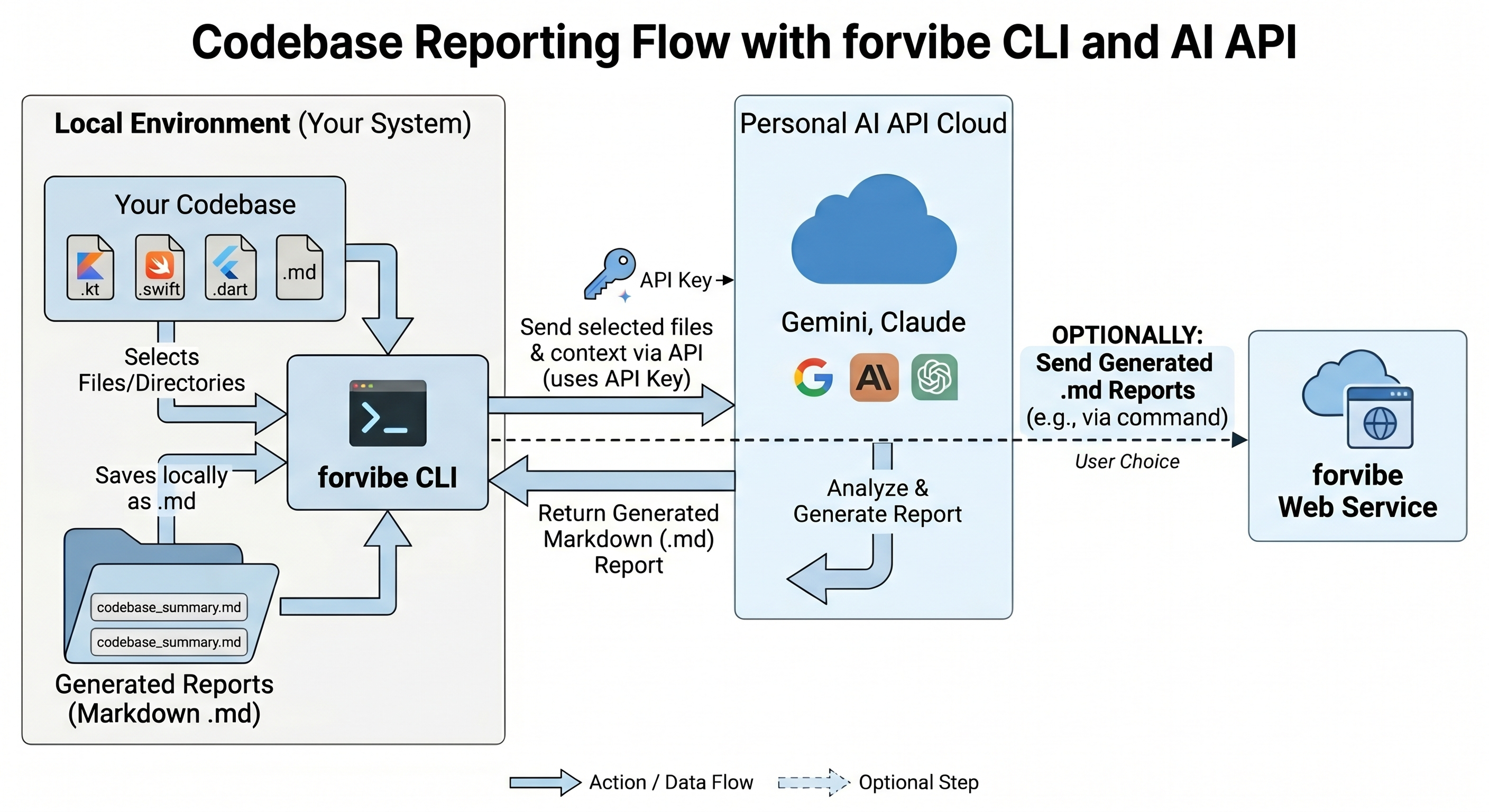
The Validation Engine A standard linter checks for syntax errors. An App Store review simulator must check for intent and compliance. The architecture operates in three distinct phases:
- Context Extraction: The CLI scans the local workspace, extracting Info.plist configurations, privacy entitlements, subscription flows, and core UI components (like SwiftUI views handling payments).
- Targeted API Interfacing: Using your specified provider, the CLI formats these components into high-context prompts evaluated against the latest Apple Review Guidelines.
- Actionable Directives: The tool parses the LLM output and generates standard output. It bypasses generic errors, returning the exact file path and the precise code adjustment required to pass review.
Implementation: Simulating the Review
The Forvibe App Review Simulation feature executes this architecture via a simple CLI tool. It operates as a local node module, integrating directly into your terminal workflow.
You define the intelligence layer by setting your preferred provider. The CLI supports multiple engines to handle the static analysis.
# Define the analysis engine in your environment
export FORVIBE_AI_PROVIDER="claude" # Supported: gemini, claude, openai
Standard vs. Deep Analysis
A standard review targets the most common rejection vectors: missing descriptions, incorrect privacy configurations, and flawed metadata. This runs in seconds and handles the surface area of your App Store Connect submission.
# Run a standard metadata and configuration review
npx @forvibe/cli review --send
For major releases, a surface scan is insufficient. The --deep flag initiates a comprehensive codebase analysis. It inspects your payment gateway implementations, data collection flows, and core architecture to identify complex guideline violations that typically trigger manual rejections.
# Execute a comprehensive source code and guideline compliance scan
npx @forvibe/cli review --send --deep
Deterministic Launches
Hope is not a valid deployment strategy. App store rejections cost engineering time, delay marketing pushes, and frustrate stakeholders.
Instead of risking your launch timeline on an opaque review queue, run the simulation locally. By utilizing the Forvibe CLI to catch and fix compliance errors before you archive your build, you ensure a healthy, predictable submission process.